Getting A New License: Oklahoma
If you are brand new to the insurance business, the first thing you need
to do is get a Resident State License.
To write Medicare plans you will need a Health & Accident License. However, we strongly recommend getting a Life License at the same time. Here are the steps we recommend
for Oklahoma:
● Order the Pre-licensing training book through the
You can buy the hard copy book for $35 or you can download the PDF version for $20.
https://www.oid.ok.gov/licensing-and-education/exam-study-manuals/
● Some Agents find it advantageous to take a live (in
person or online) study course. These will run $200 to $400 depending on
the course provider. You can find a list HERE.
We recommend AD Banker or Stone for a license prep course. They will cost $200 - $300
If you take one of these live courses, they generally
provide the manual, so you may not need to order the manual in step 1
above.
● You will want to get your Health, Accident and Life
Licenses. While you CAN market Medicare with the Health & Accident
license, we strongly recommend that you take the Life exam at the same
time, so you can find cross sale opportunities.
When you are ready to take your license Exam, go to this LINK.
Or you can call PSI: 1-833-333-4754 to set up your exam date.
You can see more info about this process at: LINK.
PSI is the company that is contracted with the Oklahoma
Insurance Department (OID) to handle licensing exams. Their website is: PSI LINK.
The cost for the Health Exam is $38.
The cost for the Life Exam is $38.
After you pass the exams, the license fee through the state is $60.
Getting A New License: Texas
Step 1: Take a pre-licensing course.
We recommend ADBanker, runs about $300.00 but is well worth it.
Here are some links to get you started:
* AD Banker Link
* Pre-licensing Course LINK
Here is the link to the specific Health & Life Course LINK
Step 2: Set up to take your Exam: $49 fee (150 minute time limit)
Use this LINK
Step 3: Get fingerprinted: Cost depends on where you get fingerprinted
Use this LINK
Step 4: Apply for your Texas State License
Use this LINK
Submit your application within one year of passing the exam, or you will need to retake the exam.
The application fee is $50
Texas Insurance Commissioner Website / Agent area:
Use this LINK
Moving to MedicarePrepare from another FMO:
There are a couple steps that need to take place in order to move your affiliation from another FMO to our group.
First, you need to know that our Carriers all know us by our Legal Name: Classic Insurance Agency LLC.
We use a variety of marketing (public facing) names: MedicarePrepare, Health Insurance Enrollment Centers, Classic Health Plans, Oklahoma Benefits Center and others, but these are all State or Federal Trademarks under Classic Insurance Agency.
Step 1: Contact your current upline and request a release. This MUST be from the top of hierarchy, not just the local Agency you work with. If you do not know who this is, we can assist you in locating that.
You may have to be persistent. Many of our competing FMO's will stall you out so that you are stuck with them for another season! Ask and then ask again.
Step 2: As soon as you make the initial request for a release, start the Self-Release process. Trust us, you will probably get the run around on getting a release from your current FMO. Do yourself a huge favor and start the Self-Release process ASAP.
With the process, the Carriers will release you to contract with us in about 90 days if your current FMO refuses to provide a 'clean release' or an 'immediate release'.
It is VERY important that you start this process immediately so you don't get stuck waiting for a release that may never materialize.
Follow these procedures to move the process along smoothly.
What to send: An email stating you would like to move
your Agent / Agency affiliation from your current FMO to Classic
Insurance Agency LLC at the earliest opportunity.
Include your Name, NPN, Email, Phone, and a note (like above) stating you would like to move.
Where to Send Self Release Request:
UnitedHealthcare:
SHCerts@uhc.com
Humana:
Step 1: Download the Humana Hierarchy Transfer Request Form
Step 2: Complete & sign the form and send it back to: Bob@MedicarePrepare.net
(We need to sign it prior to sending it in)
Step 3: After we send the signed form back to you proceed to next step
Step 4: Send the Self-Release Request & copy of the signed Hierarchy Transfer Request form to: AgentSupport@Humana.com
Globalhealth:
Email Nancy Adams at: nancy.adams@globalhealth.com
Globalhealth will release you to us immediately with no questions asked.
CommunityCare:
Email: BrokerSupport@CCOK.com
Include the info, as in UHC above, and request an immediate transfer to Classic Insurance Agency LLC / MedicarePrepare.
All other Carriers - will chat about those separately (918) 814-5550 Bob Archer: Bob@MedicarePrepare.net
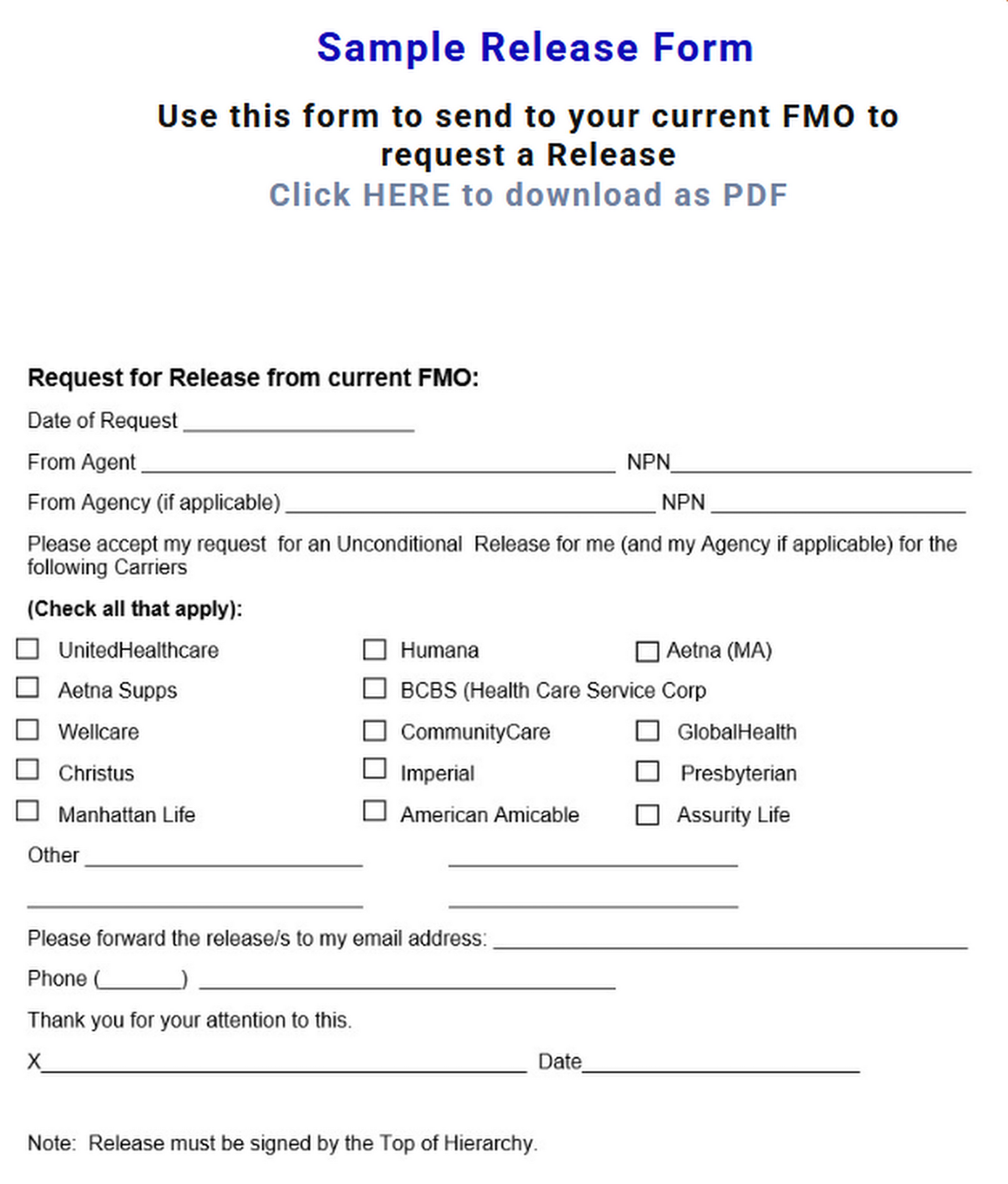
Here is a sample of the Agent Release Request form. You can download it to send to your current FMO.
Download HERE









We represent many more top quality carriers. This is just a sampling


"As an Agent, the number 1 reason I chose to join Bob and MedicarePrepare in 2017 is that every app I write is owned by me, not the Agency."

We truly hope you find success working alongside the great guys and gals at MedicarePrepare. Our goal is to help you succeed by building your own Health, Life & Medicare business.
Bob Archer / CEO
Managing Agent